Pivot tables for Obsidian Bases.
Your vault already holds the data: status, project, hours, priority. Basecraft turns any two of those into a live pivot table with totals, drill-down and export, so your notes finally answer questions instead of just listing them.
Real pivots, running in a live vault.
Cross-tabulate any two properties with any metric, turn on the heatmap, and read shares as percentages. Straight from Obsidian, no export.
Any two properties, any metric.
Pick a row property and a column property, then count, sum, average or take the min, max or median of any field. Row, column and grand totals, in a live table your vault could never give you as a plain list.
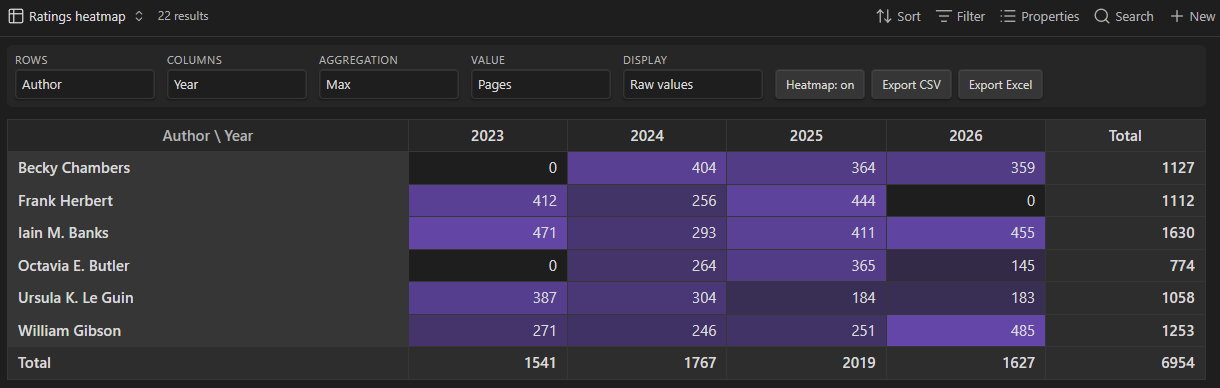
See the shape of your data.
Turn the heatmap on over any numeric field and the hot and cold cells show you where the weight sits before you read a single number.
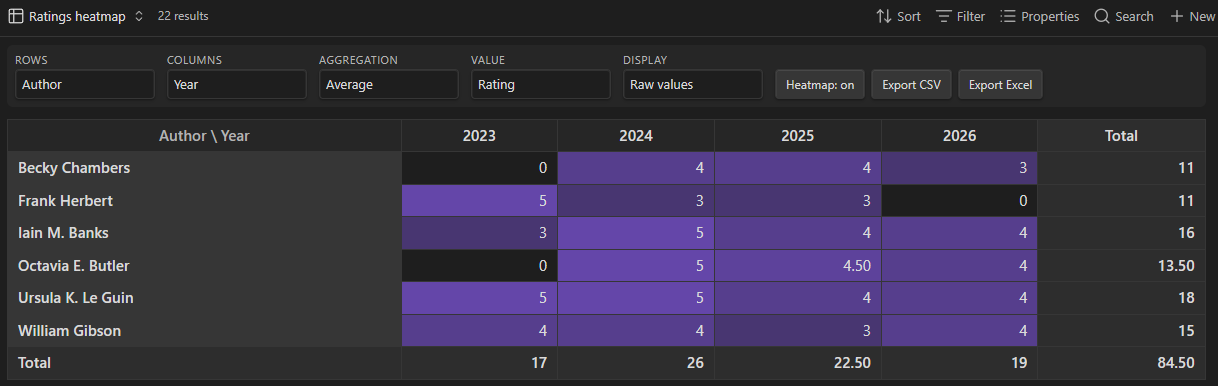
Share, not just totals.
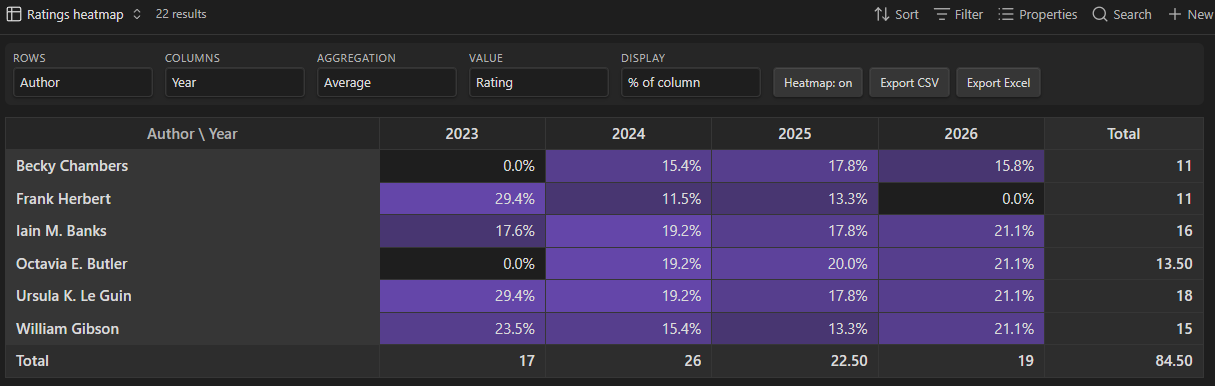
Switch any view to percent of row, column or total to read the distribution instead of raw counts, the question a plain table cannot answer at a glance.
What it does
Cross-tabulate
Pick any two note properties (status × project, author × month, tag × priority) and get a table that updates as your vault changes.
Aggregate
Count is free. Pro adds sum and average over any numeric property: hours logged per project, word counts per status, budgets per client.
Drill down
Every cell is a door: click it and see exactly which notes it counts. No more "why is this number 12?".
Export
Heatmap for scanning, CSV for scripts, real .xlsx for the people who live in Excel. Styled headers, frozen panes included.
Pricing
- Count and Sum pivots, any two properties
- Row, column and grand totals
- No account required
- Everything in Free, plus:
- Average, Min, Max, Median, Distinct count
- Date grouping by month, quarter or year
- Drill-down: click a cell, open its notes
- Heatmap and % of total, row or column
- CSV and Excel (.xlsx) export
- 3 device activations
Pay once, keep forever · Powered by Polar
Get Basecraft Pro, $14Frequently asked
How do I make a pivot table in Obsidian Bases?
Open or create a .base file, add a new view and choose Pivot, then set Rows, Columns and an Aggregation in the toolbar. Basecraft builds the cross-table from the same note properties your Bases views already use, and it updates live as the vault changes.
Is Basecraft free?
Yes. The free tier gives you the Pivot view with Count and Sum aggregations and row, column and grand totals, with no account. Pro is a one-time $14 purchase that adds Average, Min, Max, Median and Distinct count, date grouping by month, quarter or year, drill-down, heatmap, percent of total, row or column, and CSV and Excel export.
Does my vault data leave my machine?
No. The pivot engine runs entirely inside Obsidian on your device. The only network call is license validation for Pro, which sends the license key and never your notes. There is no account and no telemetry.
Does Basecraft work on mobile?
Yes. It runs on Obsidian for iOS and Android as well as on Windows, macOS and Linux, because it is a standard community plugin with no desktop-only dependencies.
Is the $14 Pro price really one-time?
Yes. Pro is a license, not a subscription. Pay once, activate on up to 3 devices, and keep every update. Future Pro additions ship as free updates.
How do I install Basecraft?
In Obsidian, open Settings, Community plugins, Browse, search for Basecraft, then install and enable it. Make sure the core Bases plugin is enabled too. You can also install it manually from the GitHub releases.
What about refunds?
Within 7 days, no questions, no reason needed. Email [email protected] with your license key. If you are a consumer in the EU you also have the statutory 14-day right of withdrawal on top of that, which our policy does not shorten. See the terms.